AI Engineering
System Design for AI Apps: What Changes When You Add an LLM
Most teams add AI to a product the same way: one API call to a model, wired straight into a request handler. It works in the demo. Then real traffic arrives, and the feature becomes the slowest, most expensive and least predictable part of the system.
The fix is not a better prompt. It is system design. An LLM is just another dependency, but it breaks several assumptions the rest of your architecture quietly relies on.
Why an LLM is a strange dependency
A database query is fast, cheap and deterministic. Ask the same question twice and you get the same answer in a few milliseconds.
A model call is the opposite on every axis:
- Slow. Responses take seconds, not milliseconds, and the time grows with the length of the output.
- Priced per token. Every request has a direct, variable cost, so a traffic spike is also a billing spike.
- Non-deterministic. The same input can produce different output, which makes testing and caching harder.
- Rate-limited and external. Providers cap requests and tokens per minute, and they have outages you cannot fix.
Each of those properties maps onto a classic system design problem. Here is the translation.
| Classic concern | What it looks like with AI | The usual answer |
|---|---|---|
| Latency | Multi-second responses block the request | Streaming, async jobs |
| Cost | Every call is billed per token | Caching, smaller models, routing |
| Throughput | Provider rate limits | Queues, backpressure, retries |
| Availability | Provider outages and timeouts | Fallback models, graceful degradation |
| Correctness | Output can be wrong or malformed | Validation, structured output, evals |
| Observability | "Why did it say that?" | Log prompts, outputs, tokens, latency |
Latency: stop making users wait on a blank screen
If a model call sits inside a normal request-response cycle, the user stares at a spinner for several seconds. Two patterns fix most of this.
Stream the response. For chat and text generation, send tokens to the client as they arrive. Total time barely changes, but the time to the first visible word drops sharply, and that is what users feel.
Move heavy work off the request path. Summarising a 50-page document, enriching a batch of leads or generating a report should not run inside an HTTP request. Put a job on a queue, return a job ID straight away, and let a worker do the model calls. The client polls or receives a webhook when the result is ready.
Client ──POST /summaries──▶ API ──enqueue──▶ Queue ──▶ Worker ──▶ LLM
   ▲                         │                            │
   └──── 202 + jobId ◀───────┘                            ▼
   └──── GET /summaries/:id (or webhook) ◀──────── Database (result)
This one change also solves your rate-limit problem, because the worker pool controls how many calls hit the provider at once.
Cost: the cheapest token is the one you never send
Model cost scales with traffic in a way that server cost usually does not. Three levers matter most.
Cache aggressively. Many AI requests repeat: the same FAQ question, the same product description, the same document summarised by ten users. An exact-match cache keyed on a hash of the model, prompt and input catches more than you would expect. We covered the general patterns in why your app needs caching; the same rules about TTLs and invalidation apply here.
Use provider prompt caching. Major providers now let you cache a long, stable prefix such as a system prompt or a reference document, so repeated calls reuse it at a lower price and latency. Put the stable parts of your prompt first and the variable parts last to benefit.
Route by difficulty. Not every task needs the largest model. Classifying a support ticket, extracting fields from an invoice or detecting language can run on a small, fast model. Save the expensive model for the tasks that actually need reasoning. A simple router that picks the model by task type is often the biggest single cost saving in an AI system.
Reliability: design for the provider being down
Your AI provider will time out, return errors and occasionally go down. Treat every model call the way you would treat a call to any third-party payment or SMS API: with a timeout, a bounded retry and a fallback.
Here is a minimal wrapper that does all three, plus caching:
type Model = { name: string; call: (prompt: string, signal: AbortSignal) => Promise<string> };

const cache = new Map<string, string>(); // swap for Redis in production

async function withTimeout<T>(fn: (s: AbortSignal) => Promise<T>, ms: number): Promise<T> {
  const ctrl = new AbortController();
  const timer = setTimeout(() => ctrl.abort(), ms);
  try {
    return await fn(ctrl.signal);
  } finally {
    clearTimeout(timer);
  }
}

export async function generate(prompt: string, models: Model[]): Promise<string> {
  const key = `${models[0].name}:${prompt}`;
  const hit = cache.get(key);
  if (hit) return hit;

  for (const model of models) {          // primary first, then fallbacks
    for (let attempt = 0; attempt < 2; attempt++) {
      try {
        const out = await withTimeout((s) => model.call(prompt, s), 15_000);
        cache.set(key, out);
        return out;
      } catch {
        await new Promise((r) => setTimeout(r, 500 * 2 ** attempt)); // backoff
      }
    }
  }
  throw new Error("All models failed");  // caller decides how to degrade
}
The last line matters as much as the rest. Decide in advance what the product does when AI is unavailable. A search page can fall back to keyword search. A "suggest a reply" button can simply hide. A core workflow should never fail completely because a model did not answer.
Correctness: never trust raw model output
A model can return text that looks right and is wrong, or JSON that is almost valid. Anything that flows into your database, your UI or another system needs a check at the boundary.
- Ask for structured output and validate it against a schema (Zod in TypeScript, Pydantic in Python) before using it.
- Ground answers in your data when facts matter. That is what retrieval-augmented generation is for; see how a RAG pipeline works and whether you need a vector database.
- Keep a human in the loop for actions that are expensive to undo, such as sending emails, issuing refunds or deleting records.
- Build a small eval set. Twenty to fifty real inputs with known good outputs, run on every prompt or model change, will catch regressions that manual spot checks miss.
Observability: log the conversation, not just the status code
A 200 response tells you nothing about whether the AI did its job. For every model call, record:
- the model name and version
- the prompt (or a reference to its template and inputs)
- the output
- input and output token counts
- latency and whether it was a cache hit
With that in place you can answer the questions that come up every week: why did cost jump on Tuesday, which feature uses the most tokens, and what exactly did the model say to the customer who complained.
Where AI fits in the architecture
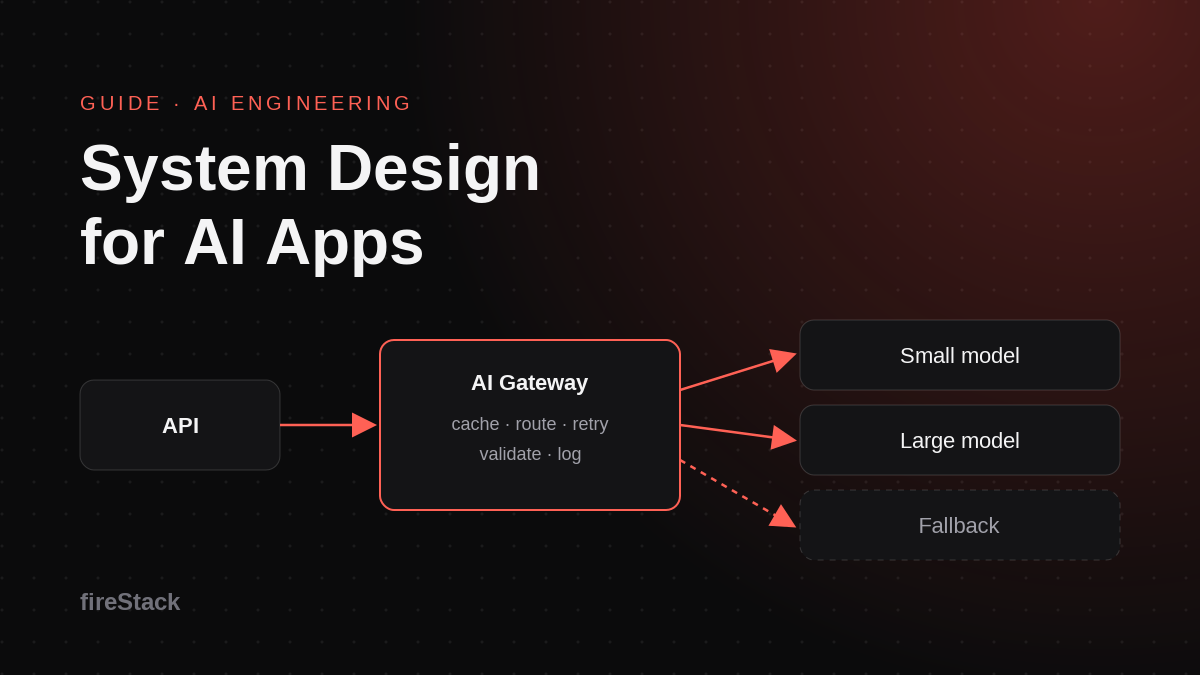
Put all of this together and a sensible shape emerges. AI is not the centre of the system. It is a service behind a clear interface, like payments or email.
            ┌──────────────┐
 Client ───▶│   API layer  │──── normal requests ───▶ Database
            └──────┬───────┘
                   │ AI requests
            ┌──────▼───────┐     ┌─────────┐
            │  AI gateway  │────▶│  Cache  │
            │ route · retry│     └─────────┘
            │ validate·log │────▶ Queue ──▶ Workers
            └──────┬───────┘
          ┌────────┴────────┐
     Small model      Large model     (fallback provider)
The "AI gateway" can start as a single module in your monolith, which is usually the right call for an early-stage product (see monolith vs microservices). What matters is that every model call goes through one place, so caching, routing, retries, validation and logging are written once instead of scattered across the codebase.
This also keeps you honest about whether a feature needs AI at all. If a rule or a database query does the job, use that. We made the case in why over-engineered AI is killing startup software.
The takeaway
Adding AI to a product is mostly a system design problem, not a prompt problem. Treat the model as a slow, expensive, unreliable external service: stream or queue the slow calls, cache and route to control cost, wrap every call in timeouts and fallbacks, validate what comes back, and log everything. Put it all behind one gateway, and the AI feature becomes as boring and dependable as the rest of your stack.
If you are planning an AI feature and want the architecture right before the traffic arrives, talk to us.