Architecture
RAG for startups: how the pipeline works and where it pays off
A language model knows a lot about the world and nothing about your company. Ask it about your refund policy, last quarter's pricing change or the error code your API returned this morning, and it will either refuse or, worse, make something up.
Retrieval-augmented generation (RAG) fixes that by looking up the relevant facts first and handing them to the model with the question. It is the most common way startups put their own knowledge behind an AI feature, and also one of the easiest to get subtly wrong.
What RAG actually is
The idea comes from a 2020 research paper by Lewis and colleagues at Facebook AI, and the core loop has not changed since:
- Retrieve: find the passages in your data that are most relevant to the user's question.
- Augment: put those passages into the prompt alongside the question.
- Generate: ask the model to answer using only that context, and to cite where each claim came from.
The model's job shifts from "remember the answer" to "read these five paragraphs and summarise what they say". That is a job language models are very good at.
The pipeline, stage by stage
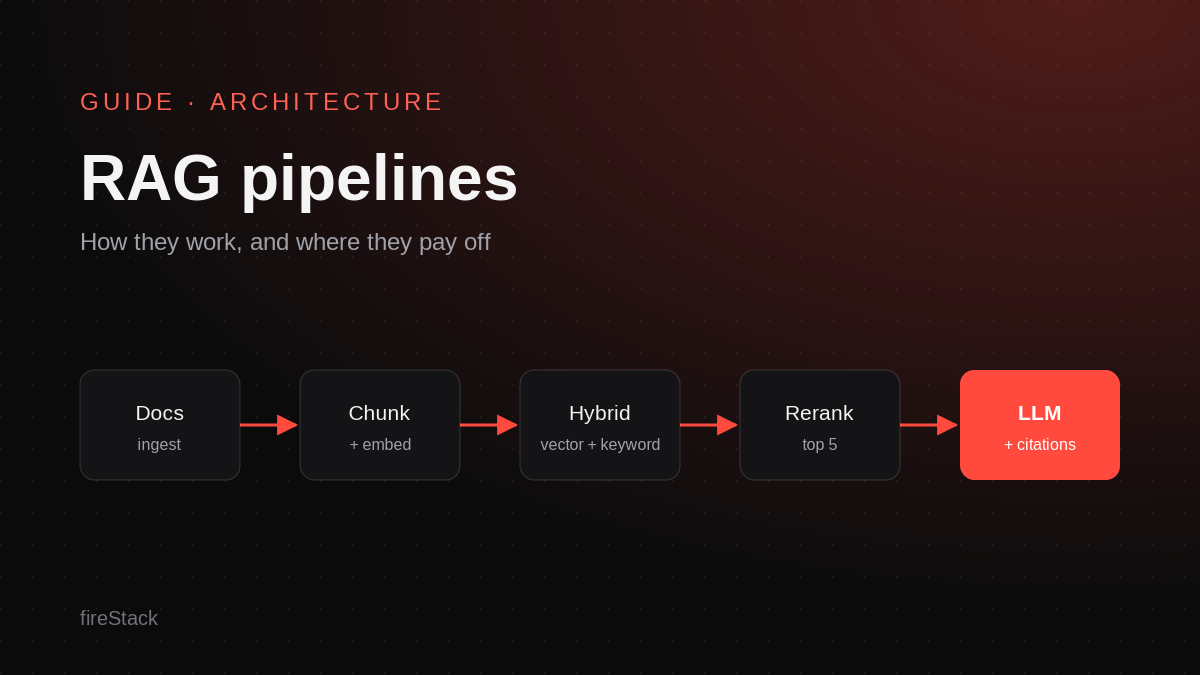
A production RAG system is two pipelines: one that prepares your data ahead of time, and one that runs on every question.
Indexing (runs when your data changes)
- Ingest: pull documents from where they live, such as help-centre articles, Notion, Google Drive, PDFs, tickets or a database.
- Parse and clean: extract the text, keep headings and tables, drop navigation menus and boilerplate. Bad parsing is the quietest source of bad answers.
- Chunk: split documents into passages of a few hundred words, ideally along headings rather than at arbitrary character counts. Keep the title and section name with every chunk.
- Embed: turn each chunk into a vector with an embedding model, so passages with similar meaning sit close together.
- Index: store the vectors and a keyword index, plus metadata such as source URL, date and who is allowed to see it.
Answering (runs on every question)
- Retrieve: run the question through both semantic (vector) search and keyword search, and merge the results.
- Rerank: score the top 20 to 50 candidates with a reranker model and keep the best handful.
- Generate: send the question and the selected chunks to the model with clear instructions: answer from the context, cite sources, say "I don't know" when the context doesn't cover it.
- Log: store the question, the chunks used and the answer. You will need this to debug and to evaluate.
Hybrid search beats vectors alone
Vector search is great at meaning: "how do I get my money back" finds the refund policy even though the word "refund" never appears in the question. It is weak at exact terms: product names, error codes, SKUs and people's names.
Keyword search is the opposite. Running both and merging the rankings covers each other's blind spots. A simple, well-known way to merge is reciprocal rank fusion: each result scores 1 / (60 + rank) in every list it appears in, and you sort by the total.
If your data already lives in Postgres, you can do all of this in one query with the pgvector extension and built-in full-text search:
-- chunks(id, content, embedding vector(1536), tsv tsvector)
-- $1 = question embedding, $2 = question text
WITH semantic AS (
  SELECT id, ROW_NUMBER() OVER (ORDER BY embedding <=> $1) AS rank
  FROM chunks
  ORDER BY embedding <=> $1
  LIMIT 20
),
keyword AS (
  SELECT id, ROW_NUMBER() OVER (ORDER BY ts_rank_cd(tsv, query) DESC) AS rank
  FROM chunks, plainto_tsquery('english', $2) AS query
  WHERE tsv @@ query
  ORDER BY ts_rank_cd(tsv, query) DESC
  LIMIT 20
)
SELECT c.id, c.content,
       COALESCE(1.0 / (60 + s.rank), 0) + COALESCE(1.0 / (60 + k.rank), 0) AS score
FROM semantic s
FULL OUTER JOIN keyword k USING (id)
JOIN chunks c USING (id)
ORDER BY score DESC
LIMIT 8;
For most startups this is enough to ship. A dedicated vector database earns its place later, when you have tens of millions of chunks or very high query volume.
Use cases that pay off for startups
RAG works best where answers already exist in writing and people waste time finding them. These are the ones we see deliver value fastest:
| Use case | Data it reads | Why it works |
|---|---|---|
| Customer support assistant | Help centre, past resolved tickets, release notes | High volume of repeat questions with documented answers |
| Internal knowledge search | Notion, Google Drive, Confluence, Slack exports | New hires stop interrupting senior people for the same answers |
| Sales and RFP answering | Security questionnaires, past proposals, product docs | Same questions every deal; answers need sources a reviewer can check |
| Developer docs assistant | API reference, guides, changelogs, code samples | Exact terms matter, which suits hybrid search well |
| Contract and policy Q&A | Contracts, policies, compliance documents | Long documents where the answer is one clause on page 37 |
| Operations playbooks | Runbooks, SOPs, incident postmortems | The answer is needed fast, under pressure, by whoever is on call |
A good first project has three things: a clear owner, a body of documents that is reasonably up to date, and a team that already answers these questions by hand, so you can compare.
When RAG is the wrong tool
- The data is structured. "What was revenue in March?" should be a SQL query, not a search over documents. Give the model a tool that runs the query instead. This is exactly the kind of tool an MCP server can expose.
- The whole corpus is small. If everything fits comfortably in the model's context window, skip the pipeline and include it all.
- You want a different behaviour, not different facts. Tone, format and domain style are better addressed with prompting or fine-tuning. RAG changes what the model knows, not how it behaves.
The mistakes that sink RAG projects
- No evaluation set. Write 30 to 50 real questions with the document that should answer each one before you tune anything. Track two things separately: did retrieval find the right chunk, and did the answer stay faithful to it? Most "the AI is wrong" problems turn out to be retrieval problems.
- Ignoring permissions. If an HR document is indexed, someone will eventually ask a question it answers. Store access rules with every chunk and filter at retrieval time, not after generation.
- Stale indexes. Re-index when documents change, and show the source date next to each citation so users can judge freshness.
- Stuffing the prompt. Twenty mediocre chunks give worse answers than five good ones. Rerank and keep the context tight.
- No citations. Answers without sources cannot be trusted or checked. Make citations part of the response format from day one.
Build or buy?
Off-the-shelf tools get you a demo in an afternoon and are fine when your data sits in one supported source. A custom pipeline makes sense when you need to combine several sources, enforce per-user permissions, control costs at volume, or keep data inside your own infrastructure. A common path is to prototype with a hosted tool, learn which questions people actually ask, then build the parts that matter.
The takeaway
RAG is not one model or one product. It is a pipeline: clean data, sensible chunks, hybrid retrieval, a reranker, a strict prompt, citations and an evaluation set. Start with one use case where the answers already exist in writing, measure retrieval before you tune the prompt, and grow from there.
Planning a RAG feature for your product or your team? Talk to us about scoping a first version.