AI Agents
Agentic CMS Use Cases: Update Your Website from WhatsApp
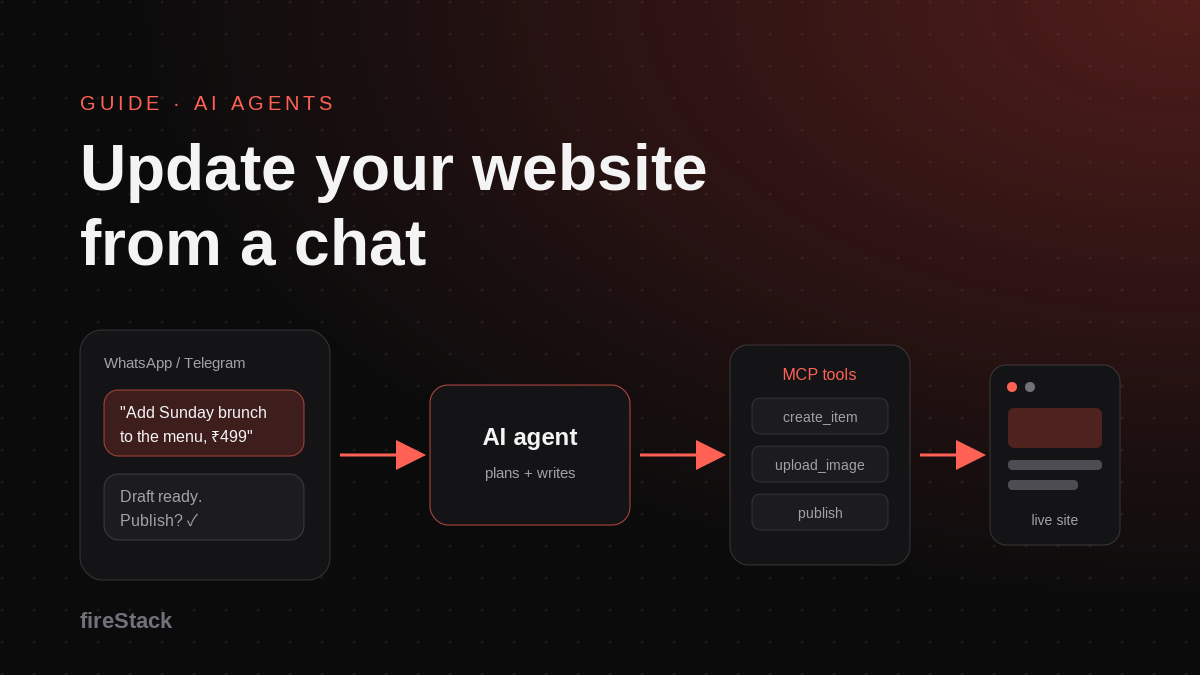
Most business websites go stale for a simple reason. The owner knows what needs to change, but making the change means logging into WordPress or Sanity, finding the right screen, and remembering how the editor works. So the update waits for "when the developer has time".
A custom agentic CMS removes that step. The owner sends a message on WhatsApp or Telegram, an AI agent turns it into content, and the change lands on the website or dashboard. This post covers where that works well, how it saves time, and how to roll it out in your business.
What a custom agentic CMS is
A traditional CMS gives you an admin panel: forms, fields, a media library, a publish button. You do the work by learning that panel.
An agentic CMS swaps the panel for a conversation. You describe what you want in plain language, from a chat app you already use. An AI agent works out what content to create or change, formats it to your site's structure, and publishes it, usually after you approve a preview.
Under the hood, the agent does not get free access to your database. It gets a small set of MCP tools (Model Context Protocol), each one a specific action such as create_post, update_menu_item or upload_image. We cover that architecture in detail in Agentic CMS: Run Your Business Dashboard by Just Asking, and MCP itself in What is MCP?.
"Custom" matters here. The tools are built around your business, not a generic content model. A restaurant gets menu and specials tools. A real estate agency gets listing tools. Nobody has to map their business onto someone else's idea of "posts" and "pages".
Traditional CMS vs agentic CMS
| Traditional CMS (WordPress, Sanity) | Custom agentic CMS | |
|---|---|---|
| How you make a change | Log in, find the screen, fill the form, publish | Send a message, approve the preview |
| Where you work | Laptop browser, usually | WhatsApp, Telegram, or a chat panel, from any device |
| Learning curve | Editor, plugins, roles, media library | None beyond describing what you want |
| Content structure | You fit your business into its model | Tools are designed around your business |
| Formatting and SEO fields | Done by hand each time | Agent fills them consistently |
| Who can update | Whoever was trained on the panel | Anyone you authorise in the chat |
A traditional CMS is still the right tool for large editorial teams with complex workflows. The agentic approach wins when the people with the content are busy owners and managers, not trained editors.
How a message becomes a live update
Here is the flow for a café owner adding a weekend special:
Owner on WhatsApp: "Add Sunday brunch to the menu, ₹499,
                    eggs benedict + coffee. Use this photo." [image]
        │
        ▼
Messaging webhook (WhatsApp Business Platform / Telegram Bot API)
        │  checks the sender is on the allow-list
        ▼
AI agent
        │  plans: upload image → create menu item → draft
        ▼
MCP tools: upload_image, create_menu_item (draft)
        │
        ▼
Agent replies: "Here's the preview: Sunday Brunch, ₹499 ... Publish?"
Owner: "Yes"
        │
        ▼
publish_menu_item  →  live on the website
Two details make this safe. Only approved phone numbers or Telegram accounts can talk to the agent. And anything that changes the public site is a draft first, so a misread message never goes live without a human seeing it.
Use cases by business type
Restaurants and cafés. Daily specials, sold-out items, price changes, festival menus and opening hours. These change often and are exactly what owners forget to update. "Mark the fish curry as sold out today" is one message instead of a login.
Retail and D2C brands. Adding new products from a photo and a few lines of description, updating stock status, running a sale banner. The agent writes the product title, description and SEO fields in the brand's tone every time.
Real estate agencies. An agent at a site visit sends photos, price, area and location. The CMS builds a structured listing page with consistent fields. Marking a property "sold" is one reply.
Coaching institutes and training businesses. New batch dates, results announcements, faculty updates and course pages. Staff who are not technical can keep the site current without waiting on anyone.
Service businesses (salons, clinics, studios, agencies). Opening hours, holiday closures, new services and price lists. Small edits that today stay stale for weeks.
Multi-location businesses and franchises. Each branch manager can update their own location's page from their phone, while the agent's permissions stop them touching other branches or brand-wide content.
Content and blogs. Founders can turn an idea into a drafted, formatted, SEO-ready article with a cover image, review it, and publish, without opening an editor.
We run our own blog this way
This post is an example. The Firestack blog at firestack.in/blog has no WordPress or Sanity behind it. It is managed by a custom MCP server that exposes a handful of tools:
{
  "tools": [
    "list_posts",
    "list_categories",
    "get_post",
    "upload_image",
    "create_post",
    "update_post",
    "publish_post",
    "unpublish_post"
  ]
}
An AI agent drafts the article, generates and uploads the cover, and calls create_post with publish: false. The post sits as a draft until it is reviewed and approved, and only then does publish_post make it live. There is no admin panel to learn, and the same tools work from a chat app, a laptop or a phone.
Notice the shape: reads are free, writes start as drafts, and publishing is a separate, explicit step. That pattern carries over to any business.
Where the productivity gain comes from
The time saved is not magic. It comes from removing specific steps:
- No context switch. The update happens in the app you already have open, not a separate dashboard on a separate device.
- No training. New staff can update content on day one. There is no "only Ravi knows how to use the CMS".
- No developer dependency for routine content. Developers stop being the bottleneck for price changes and holiday notices.
- Consistent output. The agent fills titles, descriptions, alt text and SEO fields the same way every time, which people rarely do by hand.
- Bulk edits in one sentence. "Raise all mocktail prices by ₹20" replaces a dozen form edits, with a preview of every change before it applies.
- Fresher content. When updating takes ten seconds from your phone, it actually gets done, and an up-to-date site earns more trust from customers.
How to bring it into your business
- List the updates you make most often. Menus, listings, products, hours, announcements. These become your first tools.
- Design a small set of tools around them. Keep each one narrow and typed:
mark_item_sold_out, not "edit anything". - Pick the channel. WhatsApp suits customer-facing teams in India and many other markets; it needs a WhatsApp Business Platform setup. Telegram bots are quicker to start with. A chat panel in your dashboard works too.
- Set the guard rails. Allow-list who can send commands, make writes draft-first, log every change, and give each person only the permissions their role needs.
- Keep a fallback. A simple admin view should still exist for rare edits and for the day the AI service is down.
Start with one high-frequency task, prove it saves time, then add tools as people ask for them.
Where it is not the right fit
An agentic CMS is not the answer for everything:
- Large editorial teams with multi-step review, scheduling and localisation workflows are better served by a mature headless CMS.
- Pixel-precise page design is easier in a visual builder than in a sentence.
- Payments, payroll or anything that must be exactly right with no review should not run through a language model.
- Running cost. Every request uses model calls. For small and mid-size businesses this is usually modest, but track it from the start.
The takeaway
A custom agentic CMS lets the people who own the content update it directly, from WhatsApp, Telegram or a chat window, without learning WordPress or Sanity. Built on MCP, it stays safe: the agent can only use the tools you give it, changes start as drafts, and you approve before anything goes live. For businesses whose website goes stale because updating it is a chore, that is where the productivity gain is.
Want a custom agentic CMS for your business?
We have already built and run this kind of system: the blog you are reading is managed through one. If you want the same for your website or dashboard, we would be happy to build it for you.
Here is how we work at Firestack:
- Understand your requirements. We start with how your business runs: what content changes, who changes it, how often, and from which app or device.
- Plan your MCP server. Based on those requirements, we design a custom MCP server for your business, with tools that match your real tasks (updating a menu, adding a listing, posting an announcement) and the permissions and approval rules each one needs.
- Build the server. We implement the MCP server on top of your existing website, database or dashboard, so your business rules stay in one place.
- Build your agentic CMS. We connect an AI agent to that server and set it up on the channel you prefer: WhatsApp, Telegram or a chat panel in your dashboard.
- Test, launch and grow. We test it with your team on real updates, go live, and add new tools as your needs change.
The result is a CMS shaped around your business, one you and your team can run from your phone, so day-to-day updates stop being a chore.
Talk to us about building a custom agentic CMS for your business.