AI Agents
Agentic CMS: Run Your Business Dashboard by Just Asking
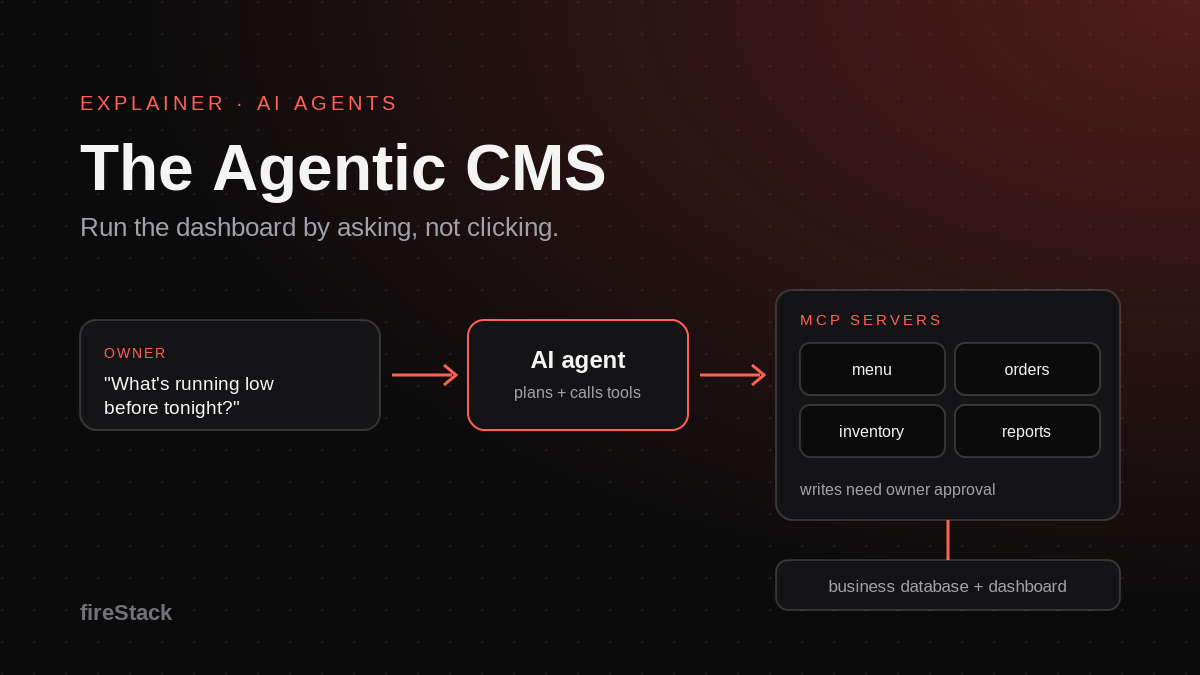
A restaurant owner at 5pm does not want to open four screens, filter a table and export a CSV. They want to ask "what's running low before tonight's rush?" and get an answer. A warehouse manager wants "which SKUs will stock out this week, and draft the reorder" without learning a new admin panel.
That is the idea behind an agentic CMS: a business dashboard you can talk to, backed by an AI agent that can read your data and take real actions, safely. This post explains how it works and how we built ours on the Model Context Protocol (MCP).
What an agentic CMS is
A traditional admin dashboard is a set of screens: menu editor, orders table, stock list, reports. The owner does the work by clicking through them.
An agentic CMS keeps those screens but adds an AI agent on top. The owner types or speaks a request in plain language. The agent works out which steps are needed, calls the right business functions, and comes back with an answer or a proposed change.
Three things separate it from a chatbot bolted onto a website:
- It acts, not just answers. It can update a price, mark a dish unavailable or draft a purchase order.
- It works on live business data, not a static FAQ.
- It follows the same rules as the dashboard. Permissions, validation and audit logs apply whether a change comes from a click or a sentence.
Two examples
Restaurant admin
- "Mark the mutton biryani as sold out for today." The agent finds the item and switches it off on the menu.
- "How did Friday dinner compare with last Friday?" It pulls sales from both nights and summarises the difference.
- "Raise all mocktail prices by ₹20." It prepares the change for every matching item and asks the owner to approve before anything goes live.
Logistics inventory
- "Which items are below reorder level in the main warehouse?" It queries stock and returns a short list.
- "Draft a purchase order for those from our usual supplier." It builds a draft PO and leaves it for review.
- "Which shipments are delayed more than two days?" It checks shipment status and lists them with their customers.
The owner never needs to know which table, filter or report holds the answer.
Why we built it on MCP
MCP is an open standard, introduced by Anthropic in late 2024, for connecting AI applications to tools and data. An MCP server exposes a set of tools, each with a name, a description and an input schema. An MCP client, the AI application, discovers those tools and lets the model call them. If MCP is new to you, start with What is MCP?.
For a business CMS, MCP gives us four useful properties:
- One server per business area. Menu, orders, inventory and reports each get their own MCP server. They are small, testable and easy to reason about.
- The model sees clear, typed actions. Instead of free access to a database, the agent gets a fixed list of tools such as
get_low_stock_itemsormark_item_unavailable, each with validated inputs. - It is not tied to one AI vendor or one interface. Any MCP-compatible client can use the same servers: a chat panel in the dashboard, a desktop AI assistant, or a future voice interface.
- It runs over plain HTTP. MCP's Streamable HTTP transport, with OAuth-based authorization, means the servers deploy like any other web API. The latest spec revision also makes requests stateless, so they sit behind a normal load balancer.
We compared MCP with a plain REST API in MCP vs API. In short, our REST API still serves the dashboard; the MCP servers are a thin layer on top that describes those same actions in a way an AI model can use.
The architecture
 Owner (chat in dashboard)
          │
          ▼
   ┌──────────────┐
   │   AI agent   │  plans steps, calls tools
   └──────┬───────┘
          │ MCP (Streamable HTTP + auth)
 ┌────────┼─────────┬───────────┐
 ▼        ▼         ▼           ▼
[menu] [orders] [inventory] [reports]   MCP servers
 └────────┴─────────┴───────────┘
          │  same business logic as the dashboard
          ▼
   Business API + database  ◀── dashboard screens
The key design choice is the bottom layer. The MCP tools call the same business logic the dashboard uses. There is one place that knows a price cannot be negative or that only managers can edit the menu. The agent cannot bypass it.
What a tool looks like
Here is a trimmed example using the official TypeScript SDK. One tool reads, one proposes a change:
import { McpServer } from "@modelcontextprotocol/sdk/server/mcp.js";
import { z } from "zod";
import { inventory, pendingChanges } from "./business"; // shared with the dashboard

const server = new McpServer({ name: "inventory", version: "1.0.0" });

server.registerTool(
  "get_low_stock_items",
  {
    description: "List items at or below their reorder level in one warehouse.",
    inputSchema: { warehouseId: z.string() },
    annotations: { readOnlyHint: true },
  },
  async ({ warehouseId }) => {
    const items = await inventory.findLowStock(warehouseId);
    return { content: [{ type: "text", text: JSON.stringify(items) }] };
  }
);

server.registerTool(
  "propose_reorder",
  {
    description: "Draft a purchase order. It is NOT sent until the owner approves it in the dashboard.",
    inputSchema: {
      supplierId: z.string(),
      lines: z.array(z.object({ sku: z.string(), quantity: z.number().int().positive() })),
    },
  },
  async ({ supplierId, lines }) => {
    const draft = await pendingChanges.createPurchaseOrder(supplierId, lines);
    return {
      content: [{ type: "text", text: `Draft PO ${draft.id} created and waiting for approval.` }],
    };
  }
);
Notice what the agent cannot do: it has no tool to send a purchase order or delete stock. It can only draft, and a person approves.
Safety rules we follow
Giving an AI model the ability to change business data needs guard rails. These are the rules we build in:
| Rule | Why it matters |
|---|---|
| Tools mirror business actions, not raw database access | The model cannot run arbitrary queries or touch tables it should not |
| Reads are free, writes are proposals | Price changes, orders and deletions wait for an owner's approval in the dashboard |
| The agent acts as the signed-in user | A cashier's agent has a cashier's permissions, nothing more |
| Every tool call is logged | Owners can see who (or what) changed what, and when |
| Inputs are validated by schema | A typo like a price of ₹20,000 instead of ₹200 gets caught or flagged |
| The dashboard stays the source of truth | If the AI is down, the business still runs |
The approval step matters most. Language models can misread a request. "Raise mocktail prices" might match an item you did not mean. Showing a clear before-and-after and asking for one tap of approval turns that risk into a minor inconvenience.
Where it helps, and where it does not
An agentic CMS works best for:
- Questions across several screens, such as comparing sales, stock and orders together.
- Repetitive bulk edits that take many clicks today.
- Owners and managers who are not comfortable with complex admin panels.
It is not a replacement for:
- High-speed operational screens like a kitchen display or a picking list, where a fixed UI is faster.
- Anything that must be exactly right with no review, such as payments or payroll.
- Good data. If stock counts are wrong in the database, the agent will be confidently wrong too.
There is also a running cost: each request uses model calls. For most small and mid-size businesses this is modest, but it is worth tracking per request from day one.
The takeaway
An agentic CMS lets business owners run their dashboard by asking instead of clicking. Building it on MCP keeps it clean: each business area becomes a small server of typed tools, the agent can only use those tools, writes wait for approval, and the same business rules apply everywhere. The AI becomes a faster way into the system you already trust, not a risky new path around it.
Want an AI layer like this on your restaurant, retail or logistics dashboard? Talk to us about what it would look like for your business.